




Codecs, formats & optimising concepts

In the worlds of still and moving images and audio, there are many differing media file formats, types and qualities. There are also a wide variety of playback systems and devices. These can be divided into two primary categories; 1) File formats, systems and devices that handle high quality, large file size media (often uncompressed), and 2) File formats, systems and devices that can only handle a restrictive size and quality of media (usually compressed).
For example, an audio CD can contain approx 72 minutes of uncompressed hi-quality stereo sound and any CD player or computer system can replay it, but because of speed limitations, CD quality audio is normally converted into the lower quality and smaller file size MP3 format before it is delivered over the internet.
Another example is a DVD video disc which usually contains compressed quality pictures and sound and requires specialist compression software (and often hardware) to replay.
What is optimising?
Optimising is the process of preparing a source/"raw" media file (typically video or audio) for playback on a target system, and usually involves converting it into a smaller (and usually lower quality) format. Optimising is normally required for 2 primary reasons ...
- To reduce a file size so that it will take up less space on a storage device (such as DVD disc or iPod)
- To reduce its file size/data rate so that it will transfer faster over a network such as the internet
The process of optimising is often called ...
- optimising (the complete process of preparing a file for a delivery technology, and which may include encoding and compression)
- encoding (the process of converting one data file file format into another and which usually involves compression)
- compressing (the process of using a codec to reduce the data rate/file size of a file)
Incidentally, the process of uncompressing a file for playback can be called ...
- Decompressing
- Decoding
Transcoding
Transcoding is the digital to digital conversion of one file format to another without involving an optimising (compression etc) process. Transcoding is often carried out in order to convert a file from an obsolete format to a current one. Transcoding may incur a quality loss.
What is a codec?
"Codec" is short for compression-decompression algorithm. It is a piece of software which is employed to compress (reduce in size) a media file (most commonly video, audio or animation) and then at a later time decompress it to allow it to be played or viewed. This process is useful for 2 primary reasons ...
- To allow more data to be stored on a given storage device (such as a hard drive, memory stick or optical disc etc).
- To increase the speed of transmission across a network (such as the internet).
The term "codec" is usually used in reference to audio and video media files, but still-image compression methodologies, such as jpeg, can also be called codecs.
Lossy and lossless
A codec may be lossy or lossless.
- Lossless. This is a process whereby clever algorithms (such as Flac) are employed to "compact" the data in a file without losing any information. Lossless compression can reduce the file size but not as much as lossy.
- Lossy. These codecs find ways to throw away information which is considered "less-essential". File size reduction can be dramatic (10 times smaller) but the effect on quality is usually noticeable.
Hard and soft codecs
A "hard(ware) codec" is integrated into the electronics of a hardware processor/device such as a DVD player, camcorder, MP3 player or video capture card.
A "soft(ware) codec" is usually installed onto a computing system (usually into the operating system folder) and runs on the computers CPU. For example, QuickTime mostly comprises a collection of soft codecs which run on a PCs CPU and which can be employed by any application to decompress, edit and replay files. Applications which employ soft codecs include, browsers, video editing, and music making applications.
Example codecs
There are many many codecs out there and new and improved ones are being developed all the time. Examples codecs include ...
- JPeg (images)
- MPeg3 (audio)
- MPeg 2 (broadcast digital TV)
- H264 (Blu-Ray video)
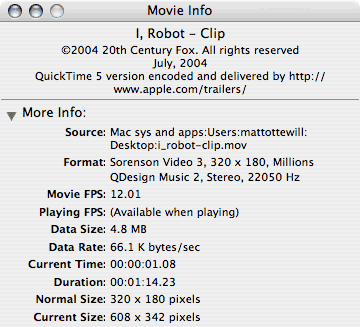
The info dialogue box showing the compression codecs, settings, data
rate/size etc for a Hollywood film QuickTime video clip trailer.
What's the difference between Codec & File format?
The distinction between file formats and codecs can be tricky to understand. We have already established what a codec is.
(Media player) File formats
File formats are usually associated with Media Player Software such as QuickTime, DivX or Windows Media Player. Media Player software usually comprises 3 elements ...
- a collection of codecs, which are usually stored in the operating system folder
- a browser plug-in interface
- a stand-alone player interface or utility/application.
For example, if you have a media file with the .mov extension, then it has been compressed with a codec that QuickTime has, and saved in the QuickTime file format. The same applies for Windows Media with its .wmv file format. The .avi file format is the old Windows format.
If a file has been saved in a proprietary media player file format it can only be played by that media player. It is not always apparent from the file format which codec is being used, only that it can replayed by a particular media player or plug-in.
How do I know what codec is being used if a media file is in a player file format?
If you encounter a video file with the .wmv (Windows Media) or .mov (QuickTime) extension you won't necessarily know what codec its been compressed with but you will know (version permitting) which player software can replay it.
Open the file in the player and choose the option to look at information about the file.