
The DV format
 Introduction
The DV (Digital Video) format is one of the many digital video standards.
The DV format was established as a semi-pro/consumer digital alternative to VHS. DV is far superior to VHS but inferior to professional broadcast digital video formats.
The format is a specification for ...
1. Camcorder design
2. DV cassette tape (3 types/sizes)
3. DV codec (the way the pictures are compressed when stored and decompressed when viewed)
4. Device control (a system for allowing a computer to control the camcorder tape in order to transfer video to a hard disk drive).
5. Recording modes
6. Audio modes
You can read about other video formats by clicking here.
Who uses DV?
The DV format has allowed video non-professionals access to high quality cost effective video equipment. People who use include DV include ...
- Web site designers
- CDROM and DVDROM creators
- Amateurs
- Location TV news gathering crews
1 & 2. Camcorder & cassette tape types
There are a number of different types of DV camcorder and cassette tape sizes. They differ according to cost and quality. The basic differences are ...
- Quality of lens
- Quality of microphone
- Number of CCD's
- Size and quality of tape cassette
Lenses & microphones
Cheaper camcorders come with fixed lenses and microphones which you cannot change. More expensive ones allow you to fit a variety of lenses and attach a high quality external microphones. The Canon XL1 (pictured below) is a miniDV camcorder with an interchangeable lens system and plugs for external microphones.
CCD's
 When light enters the lens of a DV camcorder it is focused onto a CCD (Charge Coupled Device.) The CCD is the device that converts light from the lens into digital data. Cheaper miniDV camcorders employ 1 CCD which performs the conversion process less effectively than camcorders fitted with 3 CCD's The amount of data coming from both systems is identical, but a 3 CCD camcorder will produce better colour images with a wider dynamic range (light and dark). More expensive miniDV, DVCAM, DVC Pro camcorders will have 3 CCD's
The Canon XL1S, a 3 CCD miniDV camcorder with professional features.
DV (or MiniDV) tape format
DV (usually referred to as MiniDV) uses a small tape cassette to record 60 minutes of PAL or NTSC video and audio. This is the most common semi-pro/consumer format.


DVCAM tape format
DVCAM produces the same data as MiniDV (same quality) but records it to a larger more robust tape.


DVC PRO tape format
DVC Pro uses professional grade tape and can also record in a higher quality video mode known as DVC Pro 50 which creates file sizes twice the size of MiniDV and DV CAM.


3. DV codec
The CCD from a DV camcorder produces huge amounts of data (1.4Gb per min). This is too much to be recorded directly onto the tape. Therefore it must be compressed (to 216Mb per min) first.
The camcorder has a specialist DSP chip which runs compression/decompression software (a so called codec) to compress the data before it is recorded and to decompress it when it is played back.
Hard codec
DV camcorders use a specialist DV codec which is part of the DV specification. The combination of the DSP chip and DV codec is often called a "hard codec" because it is a combination of hardware and software.
The DV codec has no parameters to adjust. It just does its job.
Soft codec
When DV video is transferred to a computer hard drive, the computer will only be able to replay and edit it if the computer has the DV codec installed on to decompress the files. Both QuickTime and Windows Media Player installations put the DV codec onto the system.
DV data flow
 Read more about DV data flow and the DV codec here.
4. Device control
The DV format includes a protocol for remotely controlling a camcorders tape transport from the computer. This enables automated capture of multiple clips (Batch Capture) from a tape according to their timecode in and out points. These instructions are sent from the editing software to the camcorder down the FireWire cable.
Timecode
DV data includes a SMPTE like timecode in the form of hours, minutes, seconds and frames (eg 00:34:12:23). This is recorded to the tape along with picture and audio data and is used by editing software to identify the location of clips and to automate transfer to the computers hard drive (a process called Batch Capture with Device Control).

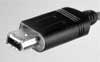 Interconnection
FireWire has been adopted as the interconnection method for transferring DV data between camcorders and computers, where it can be edited. Sony calls FireWire iLink. A FireWire cable for DV camcorders has a mini firewire plug at the camera and a standard one for the computer.
5. DV recording modes
SP & LP
DV camcorders can record in SP (standard play) record mode (60 min's a tape) or LP (long play) record mode (120 min's a tape). LP mode is not supported by most desktop editing applications.
PAL & NTSC
Click here for a description of the European and American DV/TV formats.
Aspect ratios
DVB has 4:3 and 16:9 anamorphic modes.
6. DV audio modes
DV has 4-track 12-bit 32Khz and 2-track 16-bit 48Khz uncompressed audio modes.
2 channel 16-bit 48kHz is required for compatibility with desktop editing software. Camcorder have built-in microphones of questionable quality. It is always worth paying extra for a model which allows an external microphone to be connected.
Related downloads
None at present
